
How to use the SDK
Linux provides two 1.2.1 archives (Ubuntu 22.04 and later). Choose the package for your machine:
| Machine | File | Size |
|---|---|---|
| PC / x86 industrial computer | Humanhand_G7_sdk_1.2.1_linux_x86_64.tar.gz | 4.09 MB |
| ARM64 board | Humanhand_G7_sdk_1.2.1_linux_aarch64.tar.gz | 3.46 MB |
Windows provides one 1.2.1 archive:
| Machine | File | Size |
|---|---|---|
| Windows x86_64 SDK | Humanhand_G7_sdk_1.2.1_windows_x86_64.zip | 86.45 MB |
With a G7 glove plugged in you can:
- Write no code yet — use
run.shin the package to see the hand move and to calibrate once. - After that works, link the library into your own program and poll 21 joint positions (22 if a forearm module is attached).
On Windows, send joints from the HumanHand host. Packet layout: UDP Reception – Joint Poses. This page covers only the Linux tarball.
Pick what you need right now
| Your situation | Jump to |
|---|---|
| Unpacked the archive and do not know the files | Every file in the pack |
| Want to try the glove before writing software | First run: run.sh |
| The menu is already sending joints; you want to see the hand | See the hand |
| Want the glove inside your own software | Your own program |
| Want to know what the numbers mean | What you read |
Download
Download Humanhand G7 SDK 1.2.1 from the table above or Packages. The example below uses x86_64; choose the aarch64 archive for an ARM64 board.
tar -xzf Humanhand_G7_sdk_1.2.1_linux_x86_64.tar.gz
cd Humanhand_G7_sdk_1.2.1_linux_x86_64
Paths below are relative to that directory.
Every file in the pack
The first time, you only need demo/examples/run.sh. Leave the rest closed.
Humanhand_G7_sdk_1.2.1_linux_x86_64/
├── README.md                          in-pack guide (same path as this page)
├── CHANGELOG.md                       per-version SDK changes
├── LICENSE  NOTICE                    keep these when you ship a product
├── include/hand_sdk.h                 the only header to #include
├── lib/linux/x86_64/
│   ├── libhand_runtime.so             the library you link
│   ├── libtensorflowlite_c.so.2.17.1  must sit next to the line above
│   └── param/                         factory-parameter cache; the program writes here
└── demo/
    ├── examples/
    │   ├── run.sh                     unpack-and-run script; start here
    │   ├── hand_mocap                 prebuilt demo (run.sh starts it)
    │   ├── udp_receiver.py            print UDP values in the terminal; does not save files
    │   ├── udp_receiver.md            packet format for that script
    │   ├── recv_hand_udp.py           receive joint UDP and plot
    │   ├── hand_example.cpp           sample source to copy
    │   └── compile.sh                 builds that sample
    └── docs/
        ├── Integration.md             how to link into your project
        ├── API.md                     what each function does
└── DataFormat.md 21 / 22 point layout and units| File | How you use it |
|---|---|
run.sh | Entry point. Sets the environment and starts hand_mocap. Do not launch hand_mocap by hand the first time. |
hand_mocap | Prebuilt demo: pick a serial port, calibrate, send joints. Started by run.sh. |
recv_hand_udp.py | After the demo is sending joints, run this in another terminal to see the hand. Needs python3 and python3-tk. |
hand_example.cpp + compile.sh | When you want a locally built copy of the same flow. |
hand_sdk.h + libhand_runtime.so | What you take into your app (plus libtensorflowlite_c.so* next to the runtime library). |
param/ | Filled from the glove on first connect. Do not edit by hand. |
demo/docs/ | Open when you write code; not needed for run.sh. |
Before the first run
The glove is a USB serial device. Add yourself to dialout, then log in again:
sudo usermod -aG dialout $USERPlug in the glove and list ports:
ls /dev/ttyACM* /dev/ttyUSB*Note the name (often /dev/ttyACM0). The port will not open if the host software or another program already holds it.
First run: run.sh
run.sh sets the environment the library needs, finds hand_mocap beside it, and starts that program. Go to demo/examples and run it:
cd demo/examples
chmod +x run.sh
./run.sh
It asks: one hand or two, baud (Enter keeps 921600), serial port. Then:
======== 手部动捕 ========
  1) 标定手型
  2) 手套数据读取
  3) 发送关节位姿(相对手腕)
  4) 发送关节位姿(相对小臂)
  5) 发送传感器原始数据(线圈位姿 + 线圈IMU + 磁源IMU)
  6) 对指优化-开启
  7) 抗磁干扰-弱
  8) 退出
  b) 上一步
New glove or new wearer: choose 1) first. The profile is written in the current directory (hand_profile_right.bin / hand_profile_left.bin). Tracking is poor without it.
Menu 2 reads glove information; it does not send joint poses. Menu 5 sends coil poses and inertial data, not the joint view. Menu 6 toggles fingertip opposition optimization (on by default): when the thumb tip approaches another fingertip, the solver brings the two points closer. The setting persists after calibration; do not toggle it every frame. Menu 7 cycles magnetic-interference protection through weak, strong, and off (weak by default). Menu 8 exits; b goes back one step.
If you already know the port:
./run.sh --port /dev/ttyACM0
./run.sh --port /dev/ttyACM0 --port2 /dev/ttyACM1
Two gloves must be opened in one run.sh process, not two windows.
Calibration (menu 1)
Eight takes. Each take starts with a three-second countdown and then captures automatically; pressing Enter does not start capture. After capture, press Enter for the next take, r to recapture, or b to go back one step. After all eight, it computes automatically.
| # | Gesture | Time | Pose |
|---|---|---|---|
| 1 | Palm flat, still | 2 s | Place the palm flat against a level table; straighten and bring the four fingers close together, keep still, and relax the thumb |
| 2 | Fist, still | 2 s | Make a fist and hold it still |
| 3 | Repeated fist | 5 s | Repeatedly close and open the fist; keep the four fingers close together and the thumb relaxed |
| 4 | Thumb extension | 5 s | Repeatedly bend and extend the thumb |
| 5 | Index fingertip opposition | 2 s | Bring the thumb tip toward the index fingertip; do not press the finger pads together |
| 6 | Middle fingertip opposition | 2 s | Bring the thumb tip toward the middle fingertip; do not press the finger pads together |
| 7 | Ring fingertip opposition | 2 s | Bring the thumb tip toward the ring fingertip; do not press the finger pads together |
| 8 | Little fingertip opposition | 2 s | Bring the thumb tip toward the little fingertip; do not press the finger pads together |
Send joints (menu 3 / 4)
After calibration, choose 3). Packets go to 127.0.0.1:15001 (both hands share that port, one packet each).
4) needs a forearm module. Use 3) if there is none.
Wire format: UDP Reception – Joint Poses. Your app can also skip UDP and read the SDK arrays (next section).
See the hand
With sending already started, open another terminal in demo/examples:
python3 recv_hand_udp.pySame prompts as the demo: 1 one window, 2 two windows (Enter = both). Then bind address and port (Enter = 0.0.0.0:15001, both hands share that port). Draw rate 1–6 = 20/40/60/80/100/120 Hz (Enter = 120). Left-drag orbit, right-drag pan, wheel zoom.
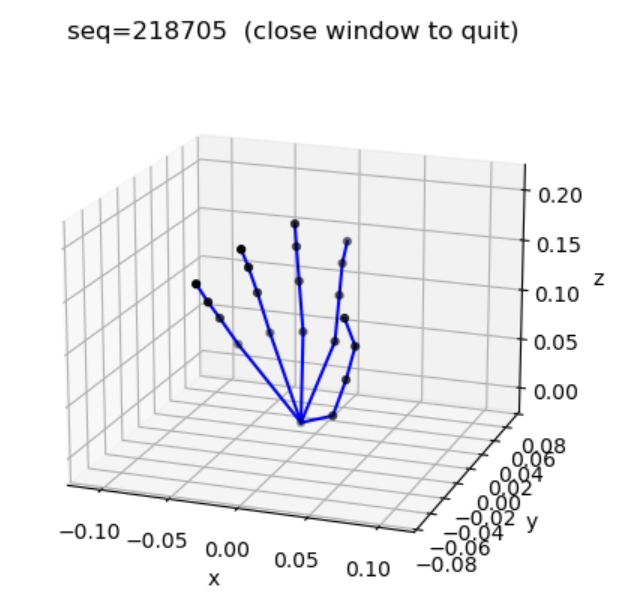
No plot: confirm the demo is still sending joints from menu 3 or 4, python3-tk is installed (Ubuntu: sudo apt install python3-tk), and the default port was not changed.
Your own program
Wire this in only after run.sh can calibrate and you can see the hand.
Take:
include/hand_sdk.hlib/linux/x86_64/libhand_runtime.solibtensorflowlite_c.so.2.17.1next to that library
Copy demo/examples/hand_example.cpp. From demo/examples, ./compile.sh builds the same menu as the demo.
Joint computation runs inside libhand_runtime.so on one thread. Run the demo with ./run.sh. In your own program, include include/hand_sdk.h and link libhand_runtime.so; ./compile.sh is configured this way. Do not set OMP_NUM_THREADS or OPENBLAS_NUM_THREADS. Keep libtensorflowlite_c.so.2.17.1 in the same directory as libhand_runtime.so.
One glove = one hh_sdk_create. Poll on one thread. Two gloves: two creates in the same program, poll both in the same loop.
#include "hand_sdk.h"

HhSdkConfig cfg = {
    .serial_port = "/dev/ttyACM0",
    .baud = 0,                          /* 0 = 921600 */
    .hand = HH_SDK_HAND_RIGHT,          /* 1 left / 2 right, same as UDP header hand */
    .profile_path = "hand_profile_right.bin",
    .cache_dir = NULL,                  /* NULL = param/ next to the library */
};
HhSdkHandle* h = hh_sdk_create(&cfg);   /* NULL on failure */
HhSdkFrame frame;
int rc = hh_sdk_poll(h, &frame);        /* HH_SDK_OK = call worked; quality is frame.status */
hh_sdk_destroy(h);
hand may be HH_SDK_HAND_AUTO (0) to read the left/right tag on the glove.
frame.status:
| status | Meaning |
|---|---|
HH_SDK_STATUS_OK | New pose this tick; usable |
HH_SDK_STATUS_NO_UPDATE | No new glove frame yet; poll again |
HH_SDK_STATUS_NO_SIGNAL | Glove online; fingers have not caught up |
HH_SDK_STATUS_UNSTABLE | No usable solution this tick. This should not appear during normal motion. The numbers are still filled; keep the last usable pose |
Magnetic-interference protection and confidence
Set magnetic-interference protection with hh_sdk_set_mag_guard(h, mode). mode must be 2, 1, or 0. Call it on the same thread as hh_sdk_poll, and do not change it every frame.
When magnetic interference is present, the output of the affected fingers stays steady. When protection is off, output keeps following the sensor data. Magnetic-field confidence remains available in all three modes.
1(default, menu “Weak”): enables protection at the normal sensitivity.2(“Strong”): engages earlier; once engaged, its effect is the same as “Weak”.0(“Off”): disables protection; output keeps following sensor data. Confidence still uses the last Weak or Strong setting.
Read back the current mode with hh_sdk_get_mag_guard. In the header, HH_SDK_MAG_GUARD_STRONG, HH_SDK_MAG_GUARD_WEAK, and HH_SDK_MAG_GUARD_OFF are 2, 1, and 0.
Magnetic-field confidence ranges from 0 to 1 for each channel; values closer to 1 are more normal. It is not in the UDP packet, and packet lengths do not change. After hh_sdk_poll or hh_sdk_poll_coils receives new data, call hh_sdk_coil_confidence; it returns HH_SDK_ERR_NOT_READY before new data arrives. Indices 0–4 are thumb through little finger, and 5 is the forearm. While sending joints, the demo prints a line about every two seconds with confidence for the five fingers.
Read the magnetic-positioning algorithm version with hh_sdk_magpose_version() (currently 1.1.4) and the SDK version with hh_sdk_version() (1.2.1). Neither function requires opening a glove.
Forearm module, 22 points relative to the forearm: call hh_sdk_forearm_root after a successful poll in the same tick.
While capturing calibration in your app, keep calling hh_sdk_poll or that take is empty. Sequence in demo/docs/API.md.
Build the sample from the SDK root:
g++ -O2 -std=c++17 -Iinclude demo/examples/hand_example.cpp \
  -Llib/linux/x86_64 -lhand_runtime -ldl -o hand_example
export LD_LIBRARY_PATH="lib/linux/x86_64"
./hand_example
Functions: demo/docs/API.md. Linking: demo/docs/Integration.md. Point map: demo/docs/DataFormat.md.
What you read
Position is in metres. Orientation is four numbers w, x, y, z. All are palm-relative (menu 3 output; SDK applications can read poses via hh_sdk_poll). Hand IDs: 1 left, 2 right (same as the UDP header).
Front / right / up follow hand anatomy:
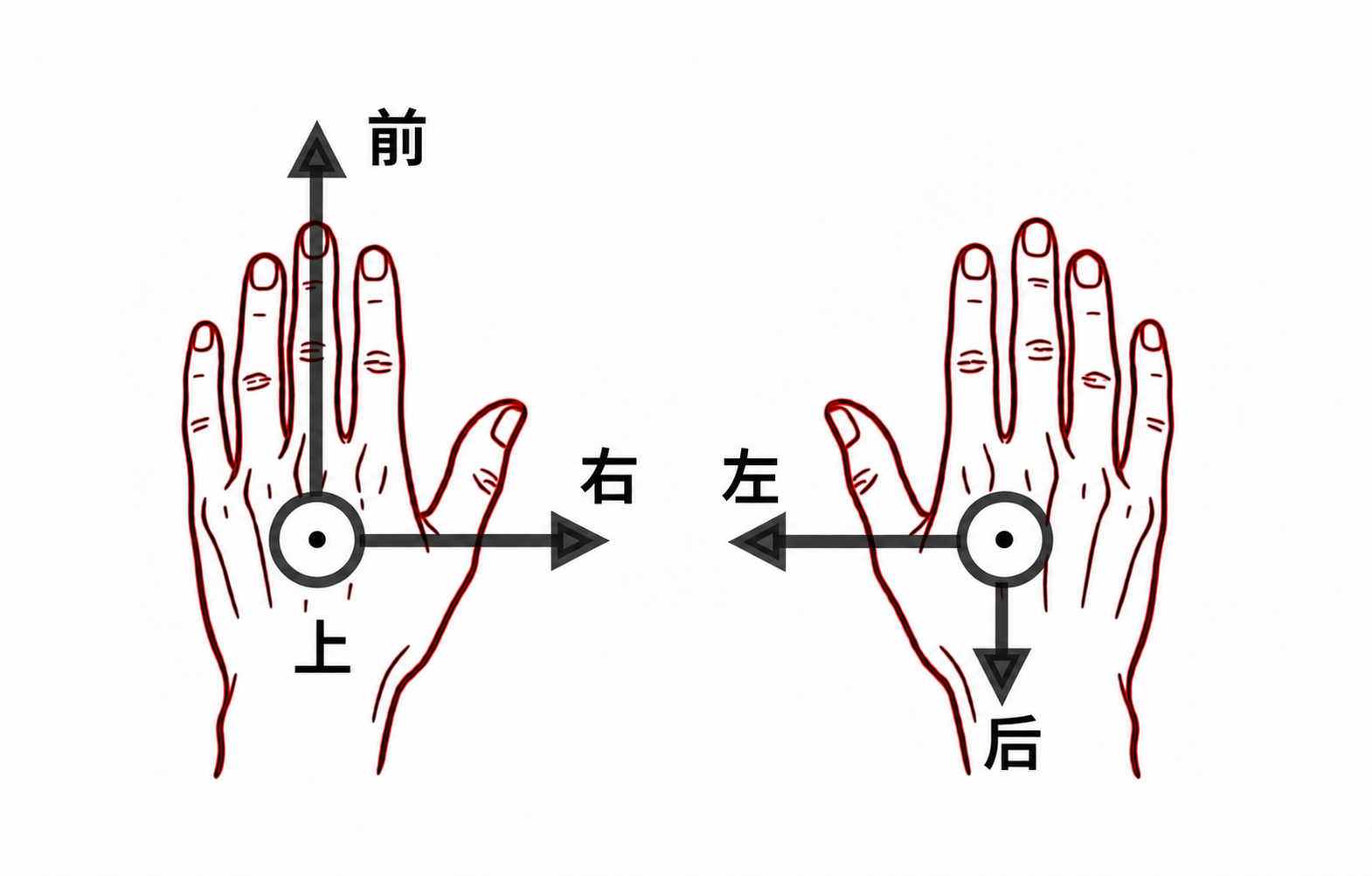
| Hand | +X | +Y | +Z |
|---|---|---|---|
| Left | right | forward (along the fingers) | up |
| Right | left | back | up |
21 points (palm-relative): 0 palm root; four points per finger (knuckle, near, far, tip), thumb → index → middle → ring → little.
22 points (forearm-relative, needs the module): 0 forearm (position 0), 1 wrist (the palm root above), 2–21 match 1–20 above.
UDP packet layout: UDP Reception – Joint Poses. Diagrams: Coordinate systems.
run.sh arguments (optional)
Follow the prompts unless you are scripting:
| Argument | Default | Meaning |
|---|---|---|
--port | (prompt) | Glove serial device |
--port2 | (none) | Second glove |
--hand | right | left or right |
--baud | 921600 | 0 also means 921600 |
--profile | hand_profile_{hand}.bin | Hand-shape file (calibration writes; tracking reads) |
--cache-dir | param/ next to the library | Factory-parameter cache |
The same flags work if you start hand_mocap directly. Prefer run.sh so the environment is set.
FAQ
| Symptom | What to do |
|---|---|
| Cannot open the glove | Port exists; you are in dialout and logged in again; nothing else holds the serial device |
version query timeout | Wrong node; try another /dev/ttyACM* on the same device |
| First-connect parameter download fails | Glove powered, port free, retry |
| Fingers barely move / pose is off | Wear the finger modules; finish the 8-take calibration |
recv_hand_udp.py shows nothing | Demo is on menu 3 or 4; python3-tk installed |
| Your program saturates the CPU | Joint computation already uses one thread inside the library. For two gloves, alternate hh_sdk_poll calls on the same thread instead of creating one compute thread per glove |
libtensorflowlite_c.so missing | It must sit next to libhand_runtime.so |
hh_sdk_create returns null | Serial port, hand id, non-empty profile_path |